Typesetting articles guide to best practice

This is a guide to best practice when posting articles for reader accessibility, search engine optimisation (SEO) and all-round professional magazine look Some of these practices are must-dos, others are recommendations. I’ll explain the whys and wherefores as we go. Typography The drop cap and first para styling are applied automatically. The first para needs…

This is a guide to best practice when posting articles for reader accessibility, search engine optimisation (SEO) and all-round professional magazine look

Some of these practices are must-dos, others are recommendations. I’ll explain the whys and wherefores as we go.

Typography

The drop cap and first para styling are applied automatically. The first para needs to be long enough to wrap around the drop cap. The drop cap should be a letter, so don’t start with a number. Opening with a quote does not defeat the drop cap styling, but it does look a little messy (to my designer eye) so I’d advise avoiding starting an article with quote marks.

In the body copy of the articles, avoid italics, bold and capitals. For all readers – neurodiverse or note – sentence-case type in Roman fonts is the easiest on the eye online.

Keep paragraphs short to avoid long runs of body text. Remember, most visitors to the site will be on mobile phones, and it is easy to fill the screen of these devices with slabs of plain text. Use crossheads and pullquotes to break up body copy.

When adding a crosshead, always add it as a an H@ heading. Type you crosshead as a new para. In the block tool bar, click on the first setting, 1, which by default is Paragraph. Select Heading. By default, this will set as H2. You can select anywhere between H1 and H6 in the tools bar 2. For the most part, though, you'll only need H2
When adding a crosshead, always add it as an H2 heading. Type you crosshead as a new para. In the block toolbar, click on the first setting, 1, which by default is Paragraph. Select Heading. By default, this will set as H2. You can select anywhere between H1 and H6 in the tools bar 2. For the most part, though, you’ll only need H2

Pullquotes

Like crossheads, pullquotes are another way of breaking up long bodies of text. They also act as eye-catching tempts for skim-scrollers and as useful landmarks for readers looking to find particular parts of long articles.

Pullquotes are easy, use the ‘Pullquote’ block and put your text in where it says ‘add quote’

Add a citation if you have one

Add the pullquote block from the block library, or use the shortcut of typing: /pullquote in your post edit. Add the text of the quote, and a citation if you have one. Please don’t put speech marks around the quote. We all know what the graphic design of a pullquote means, putting speech marks around it is a tautology.
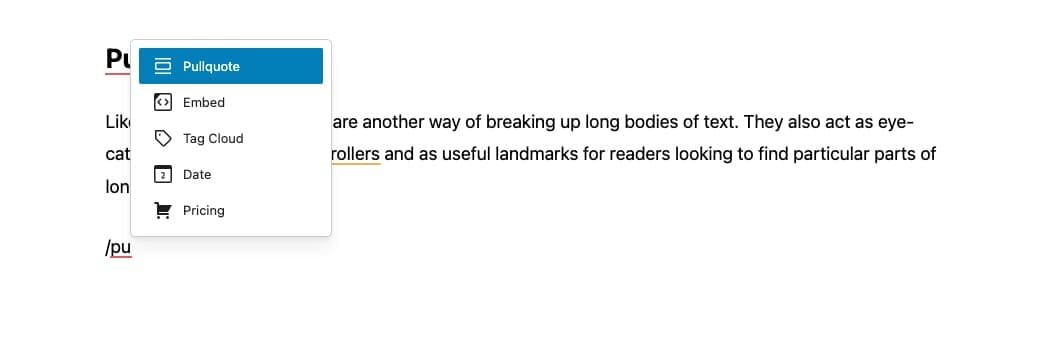
In your post edit, type '/pu...' and you'll get the contextual menu pop up offering you the Pullquote block
In your post edit, type ‘/pu…’ and you’ll get the contextual menu pop up offering you the Pullquote block
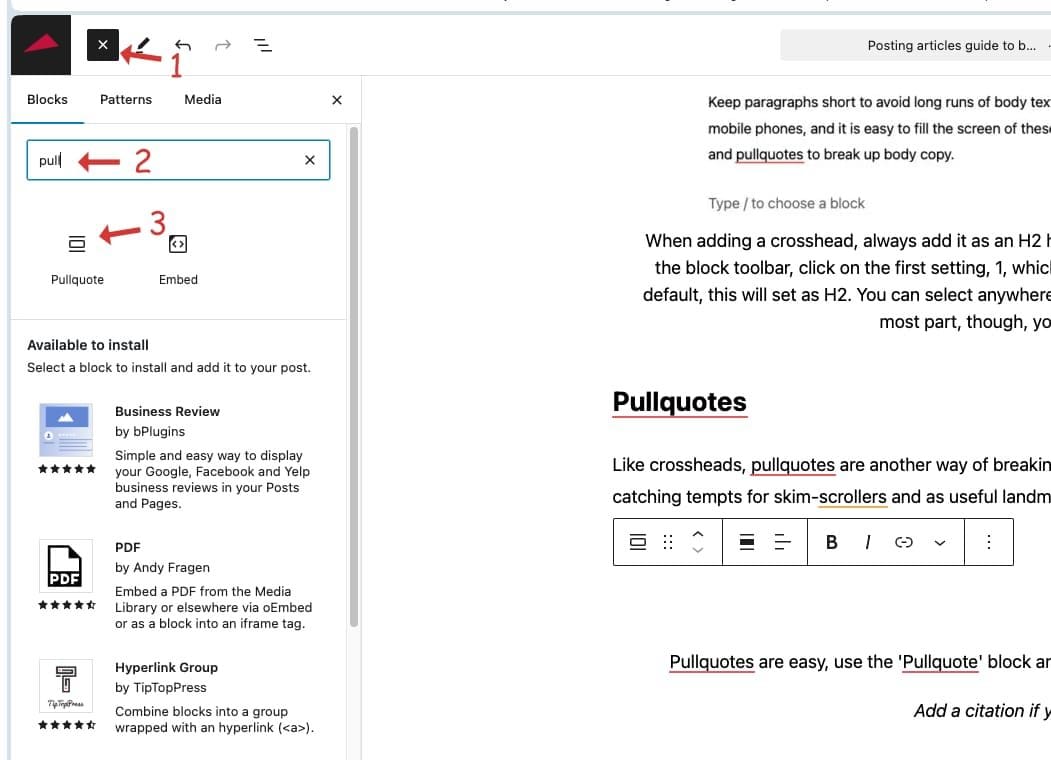
You can find the Pullquote block in the Blocks library (1) by typing 'pull...' in the search form or scrolling through the Blocks library to find the Pullquote block(3). Then drag and drop it into the post edit
You can find the Pullquote block in the Blocks library (1) by typing ‘pull…’ in the search form (2) or scrolling through the Blocks library to find the Pullquote block (3). Then drag and drop it into the post edit

Boxed-out stories

Another trusted design feature we can co-opt from printed magazines is the ‘boxout’ story. Boxout stories make for visually interesting design, as well as the function of drawing attention or demarking a particular part of the story.

Creating a boxout

Add the content you wish to place in the boxout, You can place crossheads, images and even pullquotes in a boxout if you wish.

Once you have added the content for the boxout, open the ‘List View’ to see the list of blocks in you have assembled in your post. Select the blocks you wish to place in the boxout and create a group. In the ‘Advanced’ setting in the ‘Block’ toolbar on the right there is a drop-down menu with a filed titled: ADDITIONAL CSS CLASS(ES). In this filed add the css selector ‘box-style1’- and that is it.
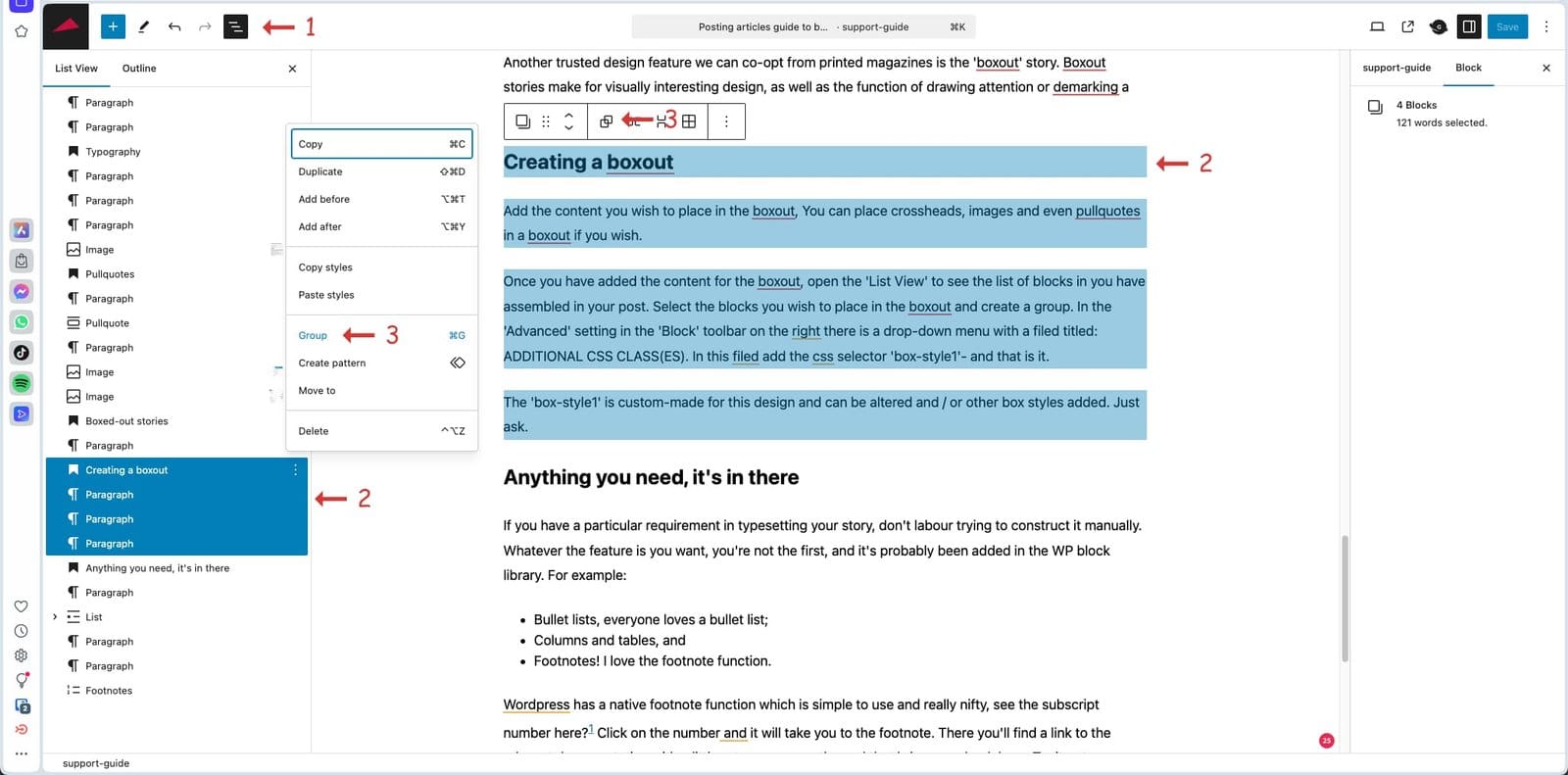
To create a boxout story, first add your content. Then open the List View (1) tool bar and select the blocks containing the content your want in the boxout (2). You can also select the blocks in your edit dashboard but that is a little fiddly, I find the List View makes it easier. Once you have the blocks selected, select Group (3) from either the List View contextual menu pop-up, to from the Group button in the block toolbar
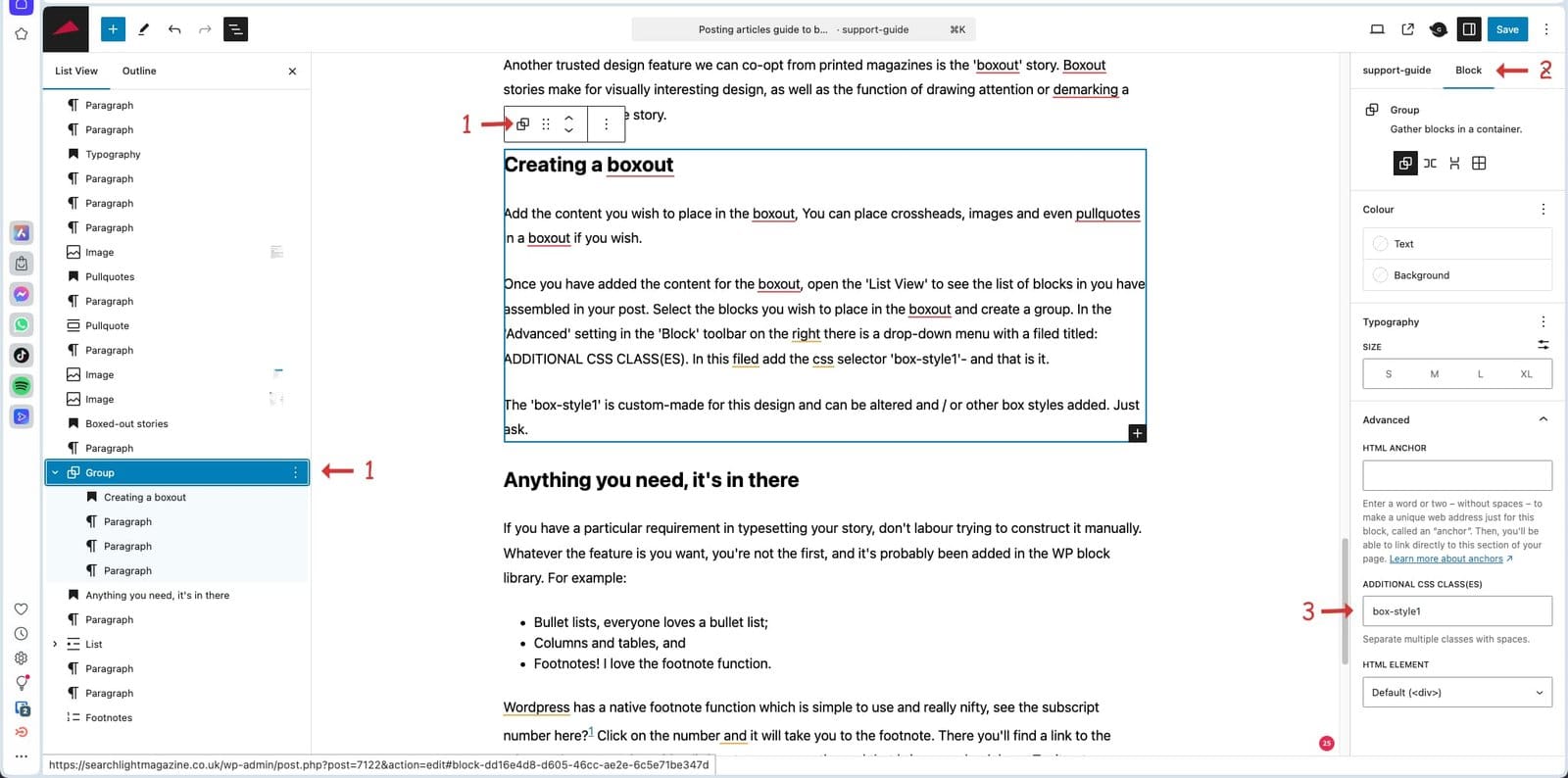
Now you have created a group of the content you want in the boxout (1) and with the group selected, navigate to the block toolbar on the right (2). Open the drop-down menu at Advanced and add the style name 'box-style1' in the Additional CSS Class(es) field and save. Now take a look round the front and voila! You've created a boxout panel in your article
Now you have created a group of the content you want in the boxout (1) and with the group selected, navigate to the block toolbar on the right (2). Open the drop-down menu at Advanced and add the style name ‘box-style1’ in the Additional CSS Class(es) field and save. Now take a look round the front and voila! You’ve created a boxout panel in your article

The ‘box-style1’ is custom-made for this design and can be altered and / or other box styles added. Just ask.

Once you have created a boxout story, you can edit, add to or delete from any of the content.

Anything you need, it’s in there

If you have a particular requirement in typesetting your story, don’t labour trying to construct it manually. Whatever the feature is you want, you’re not the first, and it’s probably been added in the WP block library. For example:

  • Bullet lists, everyone loves a bullet list;
  • Columns and tables, and
  • Footnotes! I love the footnote function.

WordPress has a native footnote function which is simple to use and really nifty, see the subscript number here?1 Click on the number and it will take you to the footnote. There you’ll find a link to the relevant documentation with a little return arrow on the end that brings you back here. Try it out.

I won’t run through all these extra formatting tools, just be aware that there is now so much useful stuff out there that if you have a particular request, ask me or Google.

Dos and don’ts

I’d recommend writing your articles outside of WordPress, as I find it is not the best tool for writing. WordPress is designed for posting articles rather than creating them. My preferred text editor is Google Docs. The finished article can then be copied and pasted into WP for setting and fettling.

If you use Microsoft Word, work in a plain text doc. Word thinks it is cleverer than you and adds junk code in its docs that can make a mess in WP.

Don’t put any formatting in your text doc other than carriage returns and italics, raw text is best.

And finally…

The Searchlight signature end tag you see at the close of this article is added automatically after the last character you type, so do not finish your post with a flurry of blank spaces and carriage returns. Stop typing with your terminal punctuation and then my whizzo coding places the graphic right here.

  1. Adding footnotes in WordPress block editor ↩︎

Professor Colin Holmes

Professor Colin Holmes
Everyone who wants to understand contemporary racism and its historical background needs to read Searchlight.
Professor Colin Holmes
University of Sheffield

Paul Holborow

Paul Holborow
In the campaign against the National Front, Searchlight provided a rich and utterly reliable basis for much ANL propaganda – particularly with reference to the two leading NF figures, John Tyndall and Martin Webster. The appearance of Tyndall in full nazi uniform, drawn from the archives of Searchlight, was a key part of ANL propaganda, coupled with deeply damaging nazi quotes from Webster.
Paul Holborow
Founding member of the ANL and National Organiser 1977-81

Paul Nowak

Paul Nowak
The essence of trade unionism is solidarity, fairness and equality – for all workers – from all backgrounds. That’s why our fight against the far-right has always been part of our movement’s DNA. Searchlight is an incredibly important resource for trade unions and members to understand the contemporary tactics of far-right activity. Their work and intelligence gathering over the years have been incredibly insightful for the work we do, and how we fight the scourge of fascism.
Paul Nowak
TUC General Secretary

Peter Hain

Peter Hain, founder of the ANL and friend of Searchlight
British Jews have been persecuted over the centuries; British blacks since the Windrush generation of the 1950s; British Muslims, especially after the Islamist 9/11 and then 7/7 terrorist attacks in New York 2001 and London 2005. But until the last few years there has not been a simultaneous threat against all three British communities of Jewish, Black and Muslim Britons – meaning the need for Searchlight has never been greater.
Peter Hain
Labour peer, former MP and Cabinet Minster

Alf Dubs

Lord Alf Dubs
Searchlight’s voice is more important than ever, and I am delighted that it will now be available to a wider audience than ever before in its new incarnation online. Searchlight has been extremely helpful over the years in exposing the far right, corruption, criminality and the murky links between organised crime and powerful interests in the UK and abroad. I wish Searchlight the very best.
Alf Dubs
Labour peer, former MP and Cabinet Minister, and Kindertransport child

Nick Davies

Nick Davies
To investigate fascists takes real courage and unusual commitment. The government, police, mainstream media occasionally take a look, but in the UK only Searchlight have kept at it, relentlessly and admirably, regardless of threat or obstacle. It’s journalism that matters. A rare thing.
Nick Davies
Multi-award-winning investigative journalist and writer

Today’s most read